
Logging and Retention
Deployment AvailabilitySome logging settings are restricted depending on deployment architecture.
Logs providing diagnostic and auditing information are kept by SmartIQ, available to authorized administrators. The logs are categorized based on their type, for example, a system error is different to audit records such as a change of password. How long each category of logs is stored is configured in Retention Settings.
Personally Identifiable Information (PII) and EncryptionDocuments, files and text data containing PII are all encrypted before storage.
Retention Settings
Retention settings determine the length of time the logs are kept. This setting can be changed in Manage > Settings > Retention.
Each setting has a default as seen in the screenshot below.
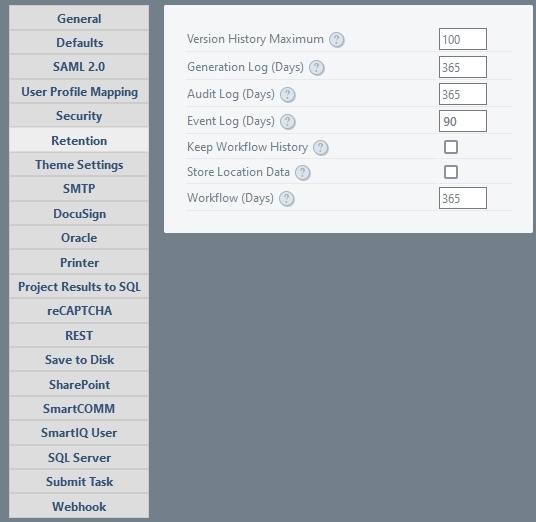
For more information on each setting:
- Version History Maximum
- Generation Logs
- Audit Logs
- Event Logs
- Keep Workflow History and Workflow Logs
- Store Location Data
Retention period changesIf retention periods are reduced, the new value will apply immediately to all existing data. At the next scheduled clean-up, all data that lies outside the new retention values will be removed.
Version History Maximum
Sets the maximum number of revisions to Projects and Content Items to retain, allowing a rollback where necessary.
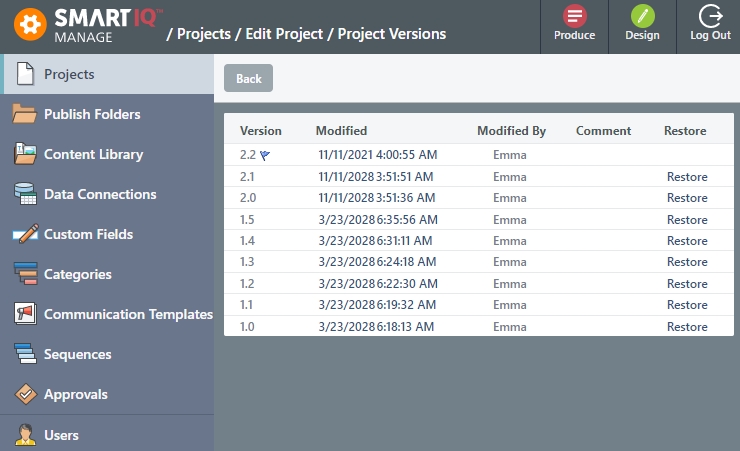
Project major and minor versionsEach save to a project in Design represents a minor version, whereas a major change is defined as when the project is closed and the designer is prompted for version comments (optional).
Generation Log
Records within then generation log track a progress once a user has opened a new form or workflow state. The record tracks:
- General metadata such as user, date started updated, etc.
- Whether the user exited the form unexpectedly, allowing recovery.
- The latitude and longitude of the user (where configured)
- The current user’s (or culmination of users where a workflow is involved) final response to each question within the form at the time the record was
Generation logs can be demanding on storage. Where possible, the default of 365 should be reduced.
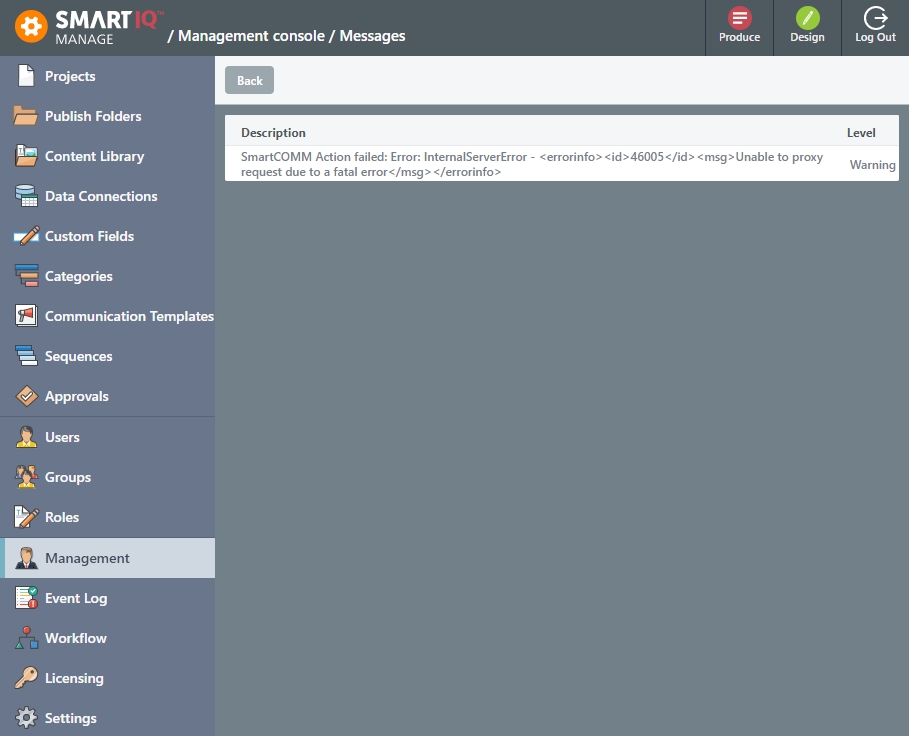
Management Console displays information or errors associated with generation logs, such as an error encountered when attempting to run an Action. These logs can be accessed from Manage > Management.
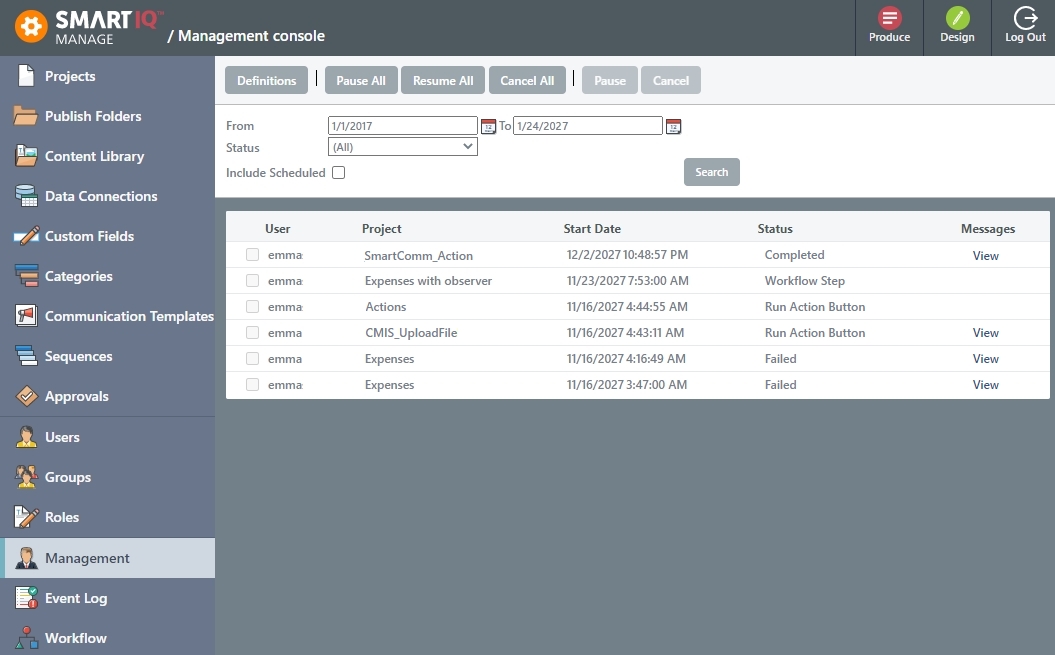
Click View for additional information.
Event Logs
The Event log tracks errors, warnings, and other events useful to system administrators. Records are viewed from Manage > Event Logs by administrators with the "View event log" permission.
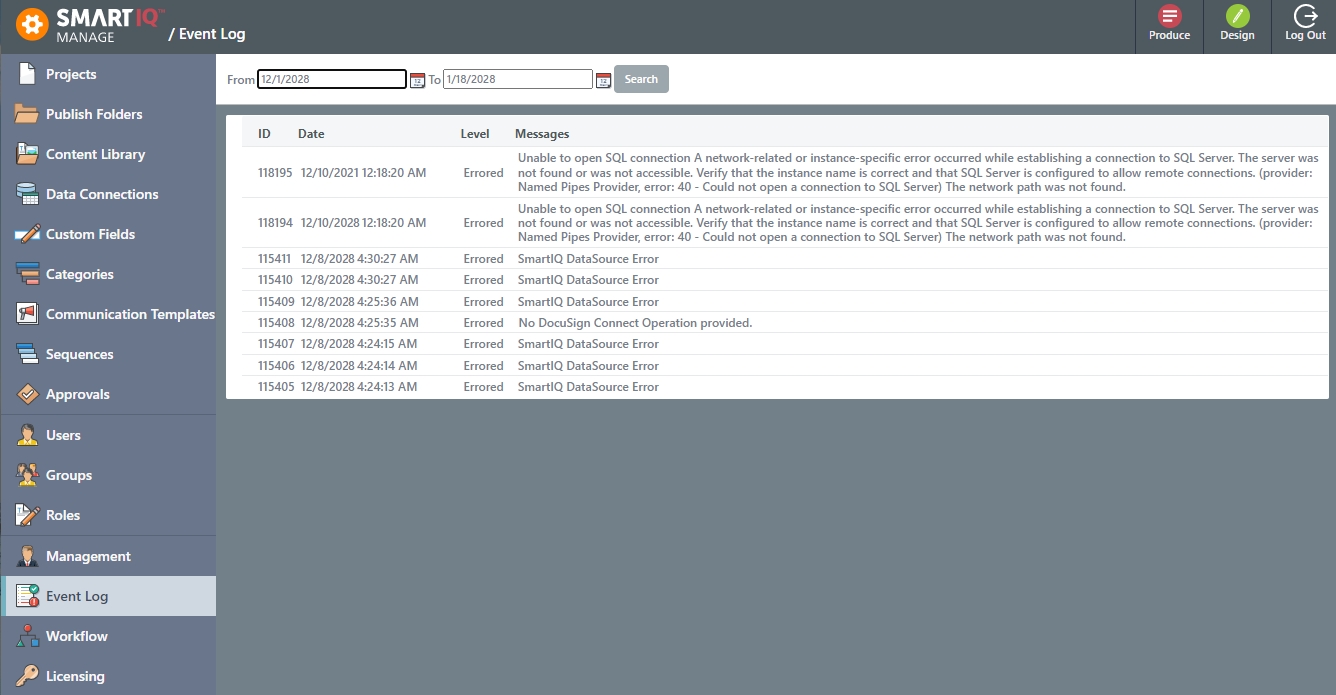
The default number of days that SmartIQ keeps Event logs is 90 days.
Keep Workflow History and Workflow Logs
Granular logs pertaining to each state within a workflow are kept by SmartIQ. Each records tracks the user, create date, updated date, state within the workflow, completeness and, most importantly, the actual responses made during the state. These records allow the tracking of changes throughout a workflow. For example, user1 responded with Apple and user2 changed the response to Banana.
Enabling the keep workflow setting will keep the completed records after the workflow has been completed in full.
Workflow data can be large in volume thus, by default, completed workflow records are removed. When configured to be kept an appropriate workflow logs retention should be considered.
Store Location Data
When configured, stores IP/location upon user login.
Audit Logs
CautionEnabling audit logs can potentially add large volumes of data to a SmartIQ environment Therefore, auditing should only be enabled as part of an investigation and not left on as a matter of course.
Additionally, audit Log require database access which may not be available in multi-tenant deployment.
Audit Logs record administrative activities and accesses within SmartIQ that are security related and can provide evidence for compliance and auditing admin activity. Logs include activities such as: Login/Logout attempts, updates to users, other system entities etc. Each record contains data such as the user and date of the event it is tracking.
Auditing is enabled or disabled from Manage > Settings > General > Enable Auditing.
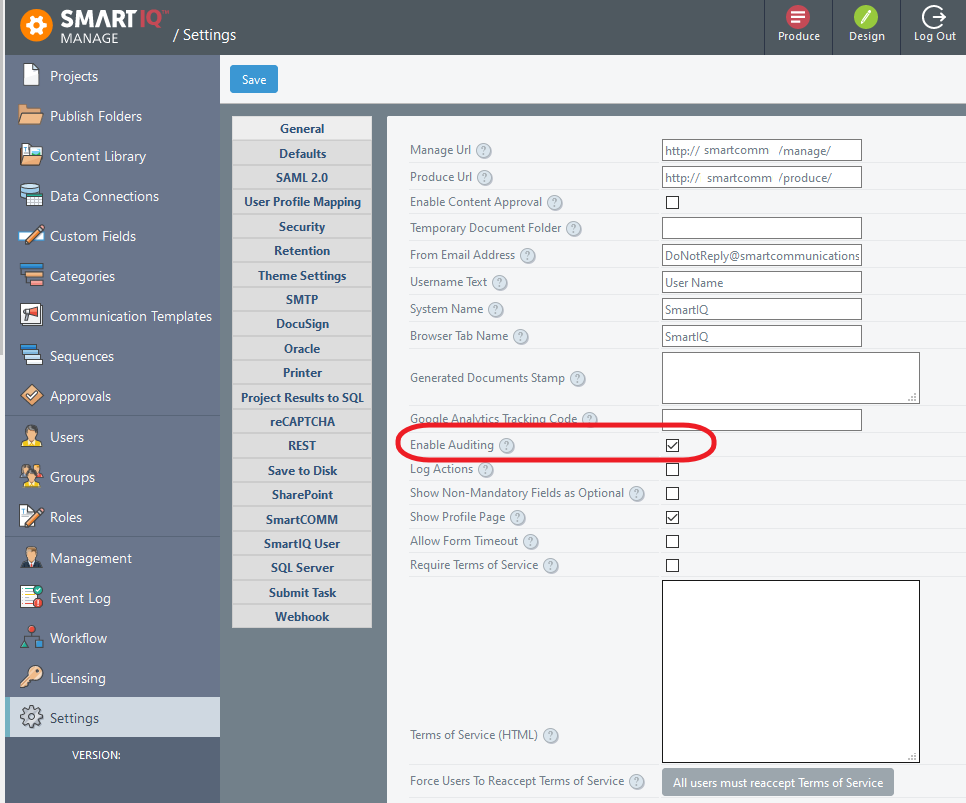
Audit logs are not available from the Manage interface and require database access to the AuditLog table. Enabling audit logs add large volumes of data and should only be enabled when necessary with an appropriate retention setting.
The following table indicates what actions are logged into the Audit Log.
| Event | Manage | Admin API | Produce |
|---|---|---|---|
| Account access control - User logged in | ✅ | ✅ | ✅ |
| Account access control - User login failed | ✅ | ✅ | ✅ |
| Account access control - Temporary User access failed | ✅ | ||
| Account access control - User changed password | ✅ | ||
| Account access control - User reset password | ✅ | ||
| Approvals - Create/Edit Approval | ✅ | ||
| Approvals - Delete Approval | ✅ | ||
| Approvals - Restore version of approval due to project version restore | ✅ | ||
| Categories - Create/Edit Category | ✅ | ||
| Categories - Delete Category | ✅ | ||
| Content Folders - Create Content Folder | ✅ | ✅ | |
| Content Folders - Edit Content Folder | ✅ | ✅ | |
| Content Folders - Delete Content Folder | ✅ | ✅ | |
| Content Library - Approve Content Item | ✅ | ||
| Content Library - Export Item | ✅ | ||
| Content Library - Create Category | ✅ | ||
| Content Library - Create/Edit Item | ✅ | ✅ | |
| Content Library - Delete Item | ✅ | ✅ | |
| Content Library - Export Historical Item | ✅ | ||
| Content Library - Delete Content Item Folder | ✅ | ||
| Content Library - Restore version of Content Item | ✅ | ||
| Create User Action - Create/Edit User | ✅ | ||
| Custom Fields Create/Edit Custom Field | ✅ | ||
| Custom Fields Create/Edit Metadata Custom Field | ✅ | ||
| Data Connections - Create/Edit Data Connection | ✅ | ✅ | |
| Data Connections - Delete Data Connection | ✅ | ✅ | |
| Data Connections - Delete Data Connection folder | ✅ | ||
| Data Objects - Delete Data Object | ✅ | ✅ | |
| Data Objects - Create/Edit Data Object | ✅ | ✅ | |
| Data Objects - Access denied to data object schema | ✅ | ||
| Data Objects - Create/Edit Custom Data column | ✅ | ||
| Data Objects - Delete Custom Data column | ✅ | ||
| LDAP Identity Provider - Create/Edit User from LDAP Login | ✅ | ||
| LDAP Identity Provider - Create/Edit User from LDAP Sync | ✅ | ||
| License - Update License | ✅ | ||
| Projects - Edit Project | ✅ | ✅ | |
| Projects - Delete Project | ✅ | ✅ | |
| Projects - Export Project | ✅ | ✅ | |
| Projects - Delete Project Folder | ✅ | ||
| Projects - Access denied to project during export | ✅ | ||
| Projects - Restore Project version | ✅ | ||
| Projects- Import Project | ✅ | ||
| Project Submission - Cancel Project Generation | ✅ | ||
| Project Sync Pack - Export Sync Pack | ✅ | ||
| Project Sync Pack - Begin Import Sync Pack | ✅ | ||
| Project Sync Pack - End Import Sync Pack | ✅ | ||
| Published Projects - Unpublish Project | ✅ | ||
| Published Projects - Publish Project/Edit Project Publish | ✅ | ✅ | |
| Publish Folders - Create Folder | ✅ | ||
| Publish Folders - Edit Folder | ✅ | ||
| Publish Folders - Delete Folder | ✅ | ||
| Roles - Create/Edit Role | ✅ | ✅ | |
| Roles - Delete Role | ✅ | ✅ | |
| SAML Identity Provider - Create/Edit User from SAML Login | ✅ | ||
| Scheduled Projects - Pause All | ✅ | ||
| Scheduled Projects - Cancel All | ✅ | ||
| Scheduled Projects - Resume All | ✅ | ||
| Scheduled Projects - Pause Selected | ✅ | ||
| Scheduled Projects - Cancel Selected | ✅ | ||
| Scheduled Projects - Edit Scheduled Project definition | ✅ | ||
| Scheduled Projects - Delete Scheduled Project definition | ✅ | ||
| Scheduler - Automatic removal of Data Controller role from user(s) | ✅ | ||
| Sequences - Create/Edit Sequence | ✅ | ||
| Sequences - Delete Sequence | ✅ | ||
| Settings - Update Settings | ✅ | ✅ | |
| Settings - Update Connector Settings | ✅ | ✅ | |
| Settings - Import Theme | ✅ | ||
| Settings - Export Theme | ✅ | ✅ | |
| Settings - Access denied to system theme during export | ✅ | ||
| User Groups - Create/Edit Group | ✅ | ✅ | |
| User Groups - Delete Group | ✅ | ✅ | |
| Users Groups - Edit Group Address | ✅ | ||
| Users - Create/Edit User | ✅ | ✅ | |
| Users - Export Users | ✅ | ||
| Users - Edit Roles/Groups | ✅ | ✅ | |
| Users - Delete User | ✅ | ✅ | |
| Windows AD Identity Provider - User Login | ✅ | ||
| Windows AD Identity Provider Create User - Basic Windows Authentication | ✅ | ||
| Windows AD Identity Provider - Create/Edit User from Windows Authentication Login | ✅ | ||
| Windows AD Identity Provider - Create/Edit User from Windows Authentication Sync | ✅ | ||
| Workflow - Terminate Workflow Task | ✅ | ✅ | |
| Workflow - Unlock Workflow Task | ✅ | ✅ | |
| Workflow - Unlock Concurrent Workflow Task for edit | ✅ | ||
| Workflow - Reassign Workflow Task to user | ✅ | ||
| Workflow Reassign - Create Temporary User for recovery of task | ✅ | ✅ | |
| Workflow Save - Create Temporary User via workflow assignment | ✅ | ||
| Client API (all areas) - Action with User Impersonation* | ✅ |
*This applies to the client API: any action with user impersonation enabled
Updated about 1 year ago