
What's New
The full What's New Guide for each release is available on the Smart Communications community, which includes knowledge base articles, release notes, product and service notifications as well as forums where you can post and collaborate with staff and customers.
If you do not have access to the Community, please let us know at [email protected]
IQ15 LTS
Released 6 June 2022
With the support period for Microsoft .Net Core 3.1 expiring this year a version of IQ15 named IQ15 LTS has been released which has been replatformed to run on Microsoft .Net 6.
For more information, refer to Upgrade to IQ15 Long Term Support
IQ15.11
Released 20 February 2022
OneSpan signing ceremony on submission
The OneSpan Sign Connector for SmartIQ has been enhanced to include a new action called "Create OneSpan Signing Url". This action takes a created OneSpan package and returns a Uri which can be used with the SmartIQ Redirect Action to take the end user submitting the form directly to the OneSpan signing ceremony in a single seamless experience.
For more information, refer to OneSpan.
IQ15.9
Released 23 January 2022
Theme Builder Import and Export
SmartIQ Manage has been enhanced to include management tasks for site and project themes created in Theme Builder. The new exchange file with the suffix .iqtheme allows a theme to be manually transferred between tenancies or shared with others.
Available from the Theme settings within Manage this UI covers both the import and export functions.
CMIS Document Update Action
SmartIQ IQ15.5 release introduced the CMIS connector into the platform. This release extends the functionality to include the CMIS Update Document Action.
The CMIS Update Document Action allows use cases where a versionable document type exists in the repository and the document itself is being updated. The target document can be identified by it’s document id.
Customer driven enhancements
Customers can raise requests through the Support Team for enhancements to help deliver new and innovative solutions using SmartIQ. Many of the enhancements across all releases originate from ideas in the field.
Within this release the following were included:
Published Project Guid as a Variable
A Designer can access the system generated Published Project Guid of the current project using a Variable question. This is the same value used within the Data Grid launch menu or generated within emails for users to open directly into workflow tasks.
Project Version as a Variable
A Designer can access the the system generated Project Version of the current project using a Variable question.
Additional Logging in Troubleshooting Mode
Actions and Documents that are skipped during execution will now log that they were skipped if Troubleshooting is enabled. This allows a Designer to check that documents or actions not supposed to be generated or run are executing the desired behavior.
IQ15.8
Released 9 January 2022
SAML Logout HTTP-Post Support
SmartIQ now supports two request types for performing and integrating Single Log Out (SLO) using SAML 2:
- A Logout Request with its Signature (HTTP-Redirect binding). Default, not new.
- A Logout Request with the signature embedded (HTTP-POST binding). New option in Manage > Settings > SAML 2.0
This new binding option expands the number of industry standard identity providers which SmartIQ can support for SAML Single Log Out.
For more information, refer to SAML.
IQ15.7
Released 12 December 2021
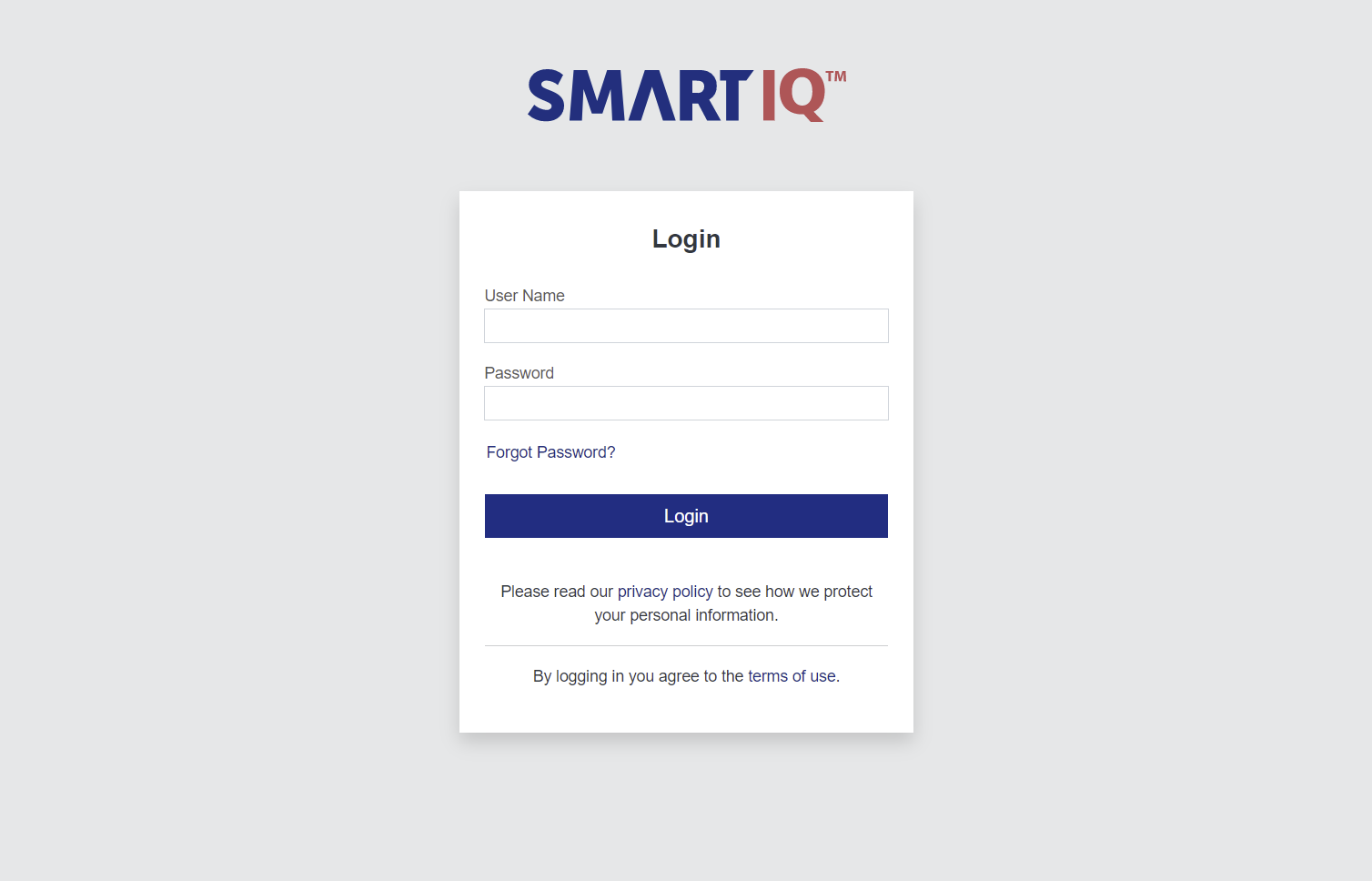
Theme Builder Login Page Support
This release expands the scope of Theme Builder to cover the various login, reset and access code screens used for unauthenticated users.
This optional behavior allows the Administrator to reuse the logo and color selections on the Brand category in Theme Builder to dynamically render a new, on brand login experience.
An optional disclaimer or introduction text is also available to display on screen.
For more information, refer to Theme Builder Login Page.
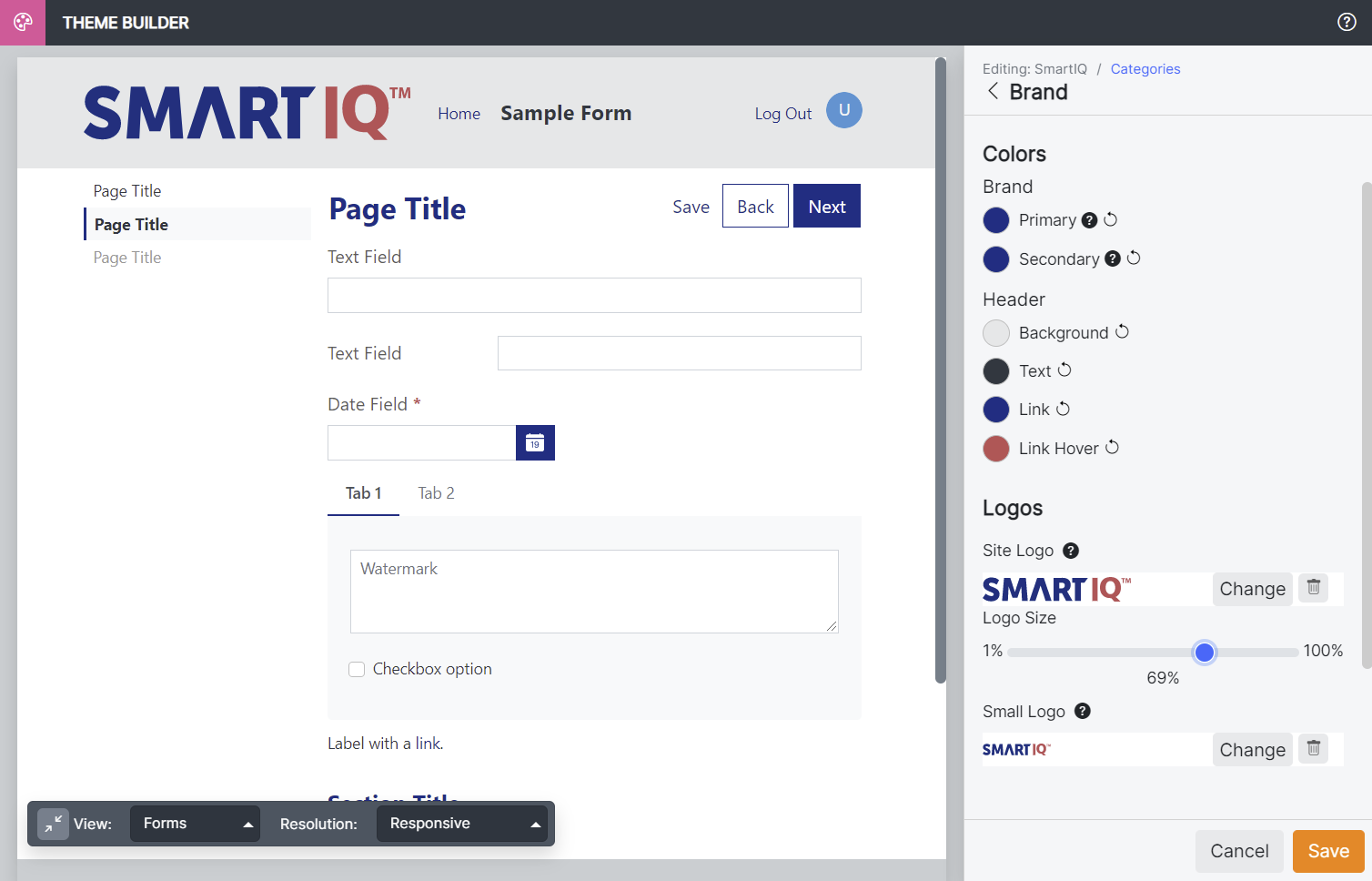
Theme Builder Logo Enhancements
In addition to raster image types like PNG and JPG, SmartIQ now supports uploading an SVG for the Theme Builder main header logo.
The main logo also includes a slider control to adjust the size of the main logo for use in the header.
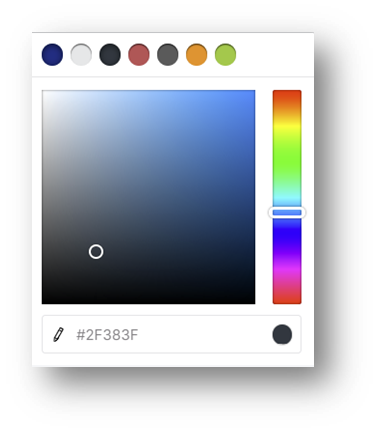
Theme Builder Color Swatches
In this release color swatches have been added to the color picker allowing the user easily re-use a color without having to find it and copy / paste across multiple areas of Theme Builder categories.
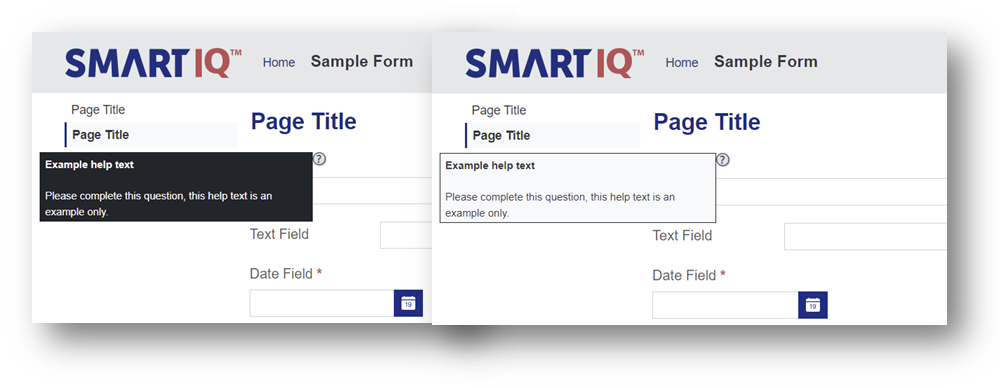
Theme Builder Help Text Style
Styling of the help text boxes used at the question level was also delivered in this release. Selecting from a light or dark option to reflect the overall aesthetic of a theme.
IQ15.6
Released 28 November 2021
Multi-File Upload
Attachment upload has always been an important part of the SmartIQ form experience, and while multiple files could be handled within a repeating section, users sometimes need a simpler way to handle many file attachments.
This version introduces a streamlined approach to multi-file uploads. You can now select – or drag and drop – multiple files at a time. The multi-file upload dialog is presented as a modal, and each file shows name, status and progress information, as well as the option to remove.
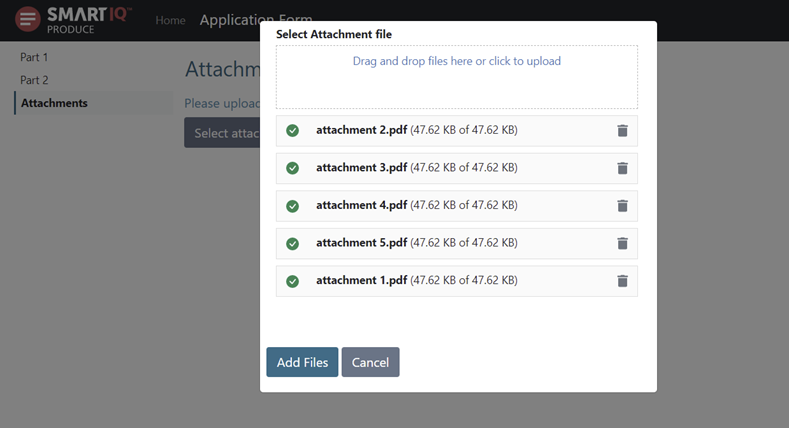
Currently multi-file uploads is available for attachments only.
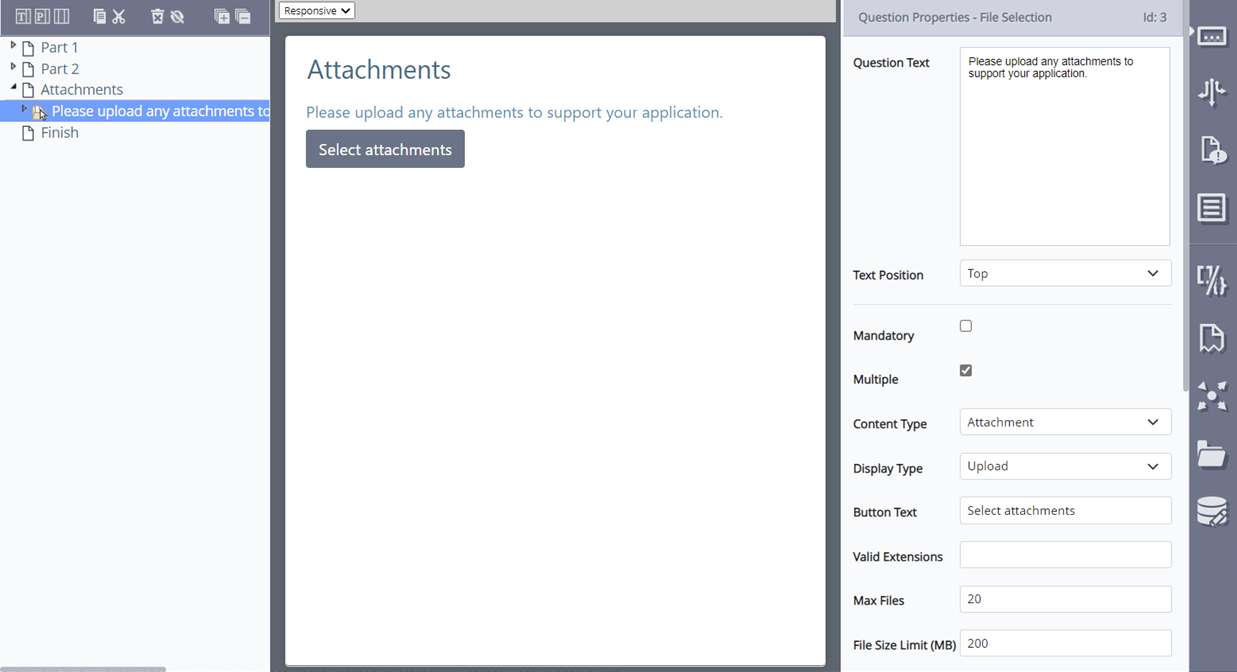
Once ‘Multiple’ is enabled on the File Selection question, you can control the number and size of files uploaded, as well as valid file extensions.
Auto-Assigned User Groups
Currently when users are added they are automatically assigned to built-in system groups. For example ‘SmartIQ Users’, but customers have not been able to control this.
A new option has been added to groups to mark them as ‘Auto Assigned’, which will be set by default for built-in system groups. This allows customers the ability to configure exactly which groups are assigned for new users regardless of whether built-in groups or not.
This feature works both for manually created users, and for those created via the API, and for both methods you can optionally skip the auto assignment process altogether.
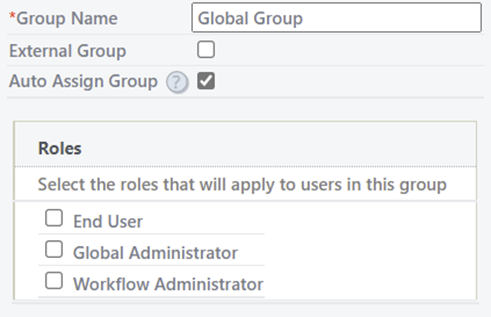
For more information, refer to Auto Assign for Groups.
Multi-Select Data in Form Summary
Prior to this version, the Form Summary for multi-select data questions would only show the number of rows selected, and did not show any of the actual selected data.
Now the summary will include a list of the selected items from a multi-select data question, including data grid questions, list boxes and drop-downs.
IQ15.5
Released 14 November 2021
Width Options in Theme Builder
Theme Builder has introduced a new option allowing a theme to determine whether to use the new default ‘constrained’ width, with added left/right margin, or ‘full’ width which pushes the content to 100% of the available space.
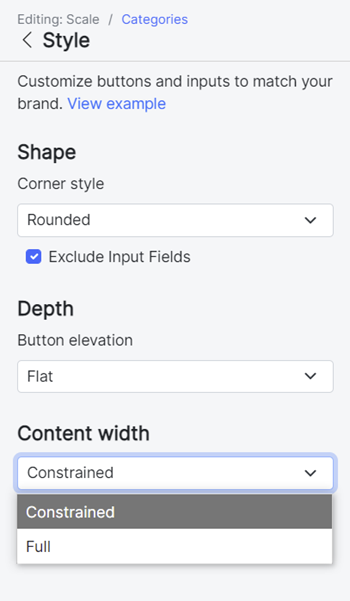
While the new constrained width view provides a modern feel, and works well for many situations, the wider view can be critical for certain forms and processes.
Automatic Retry on Escalations
Escalations perform automatic background tasks based on timed events, however if they run into problems on execution there was previously no automated resilience.
Version 15.5 introduces retry on Escalations, similar to what is already available for Actions – this can help achieve success through temporary or intermittent issues such as network outage.
If a retry is configured, when the Escalation fails it will wait for a specified delay period before being added back in the queue for processing during the next scheduler run.
CMIS Connector
Content Management Interoperability Services (CMIS) provides a standard way of communicating with Content Management Systems.
SmartIQ now provides a CMIS connector available in the pure cloud environments for customers to both read and write documents and metadata from compliant Content Management Systems. The connector supports both CMIS 1.0 and 1.1 standards.
The CMIS Save Document Action allows you to push documents and metadata to a target folder in the Content Management System. The CMIS Data Connection allows you to list folders, documents and retrieve metadata.
For more information, refer to CMIS Connector.
IQ15.4
Released 31 October 2021
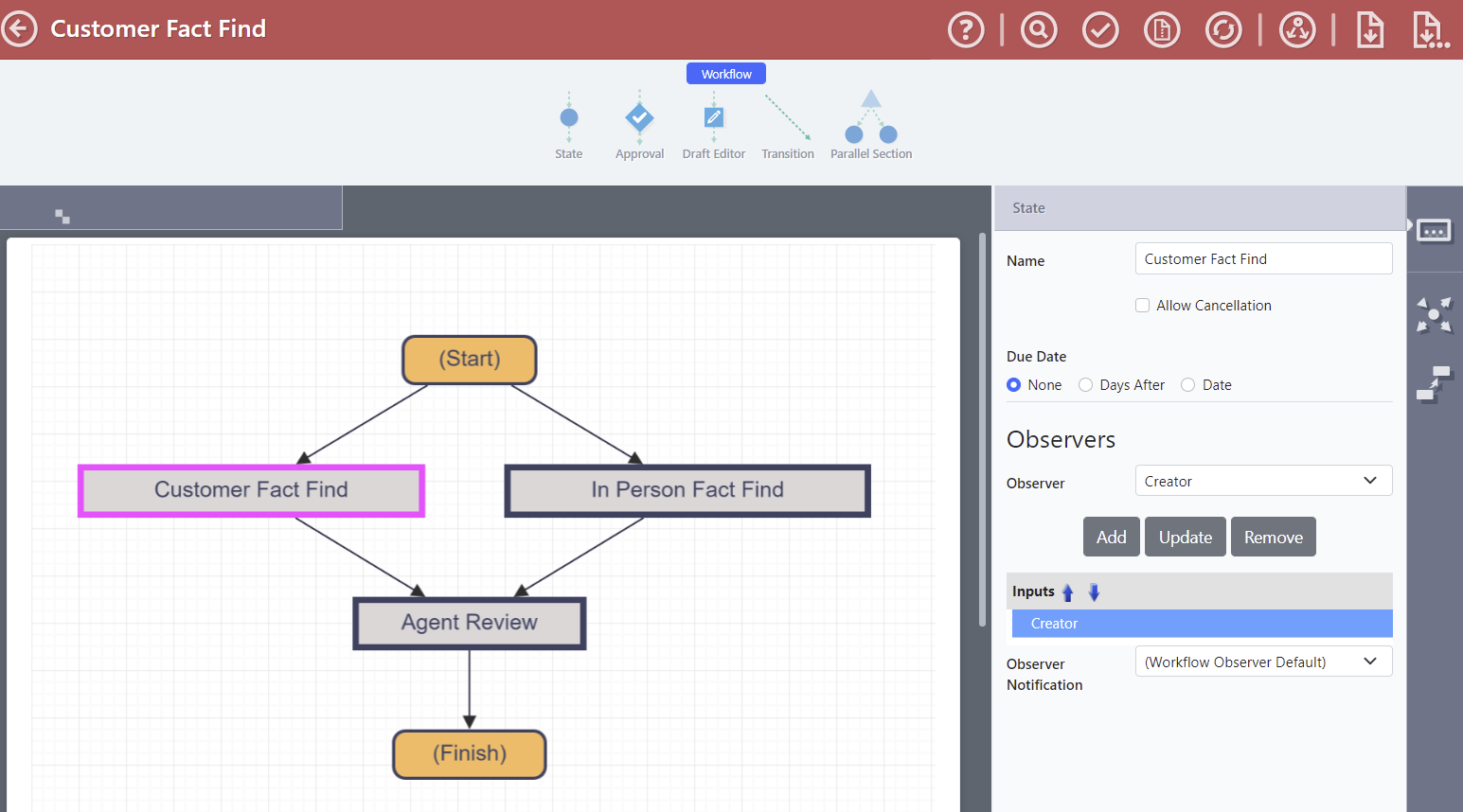
Designers can now include any number of stakeholders as workflow observers, a new passive role that allows someone to monitor the progress of a workflow.
An observer can make comments where commenting has been enabled, however they may not make any other changes to a form, nor can they submit, approve or reject the form.
Adding observers to a workflow subscribes them to relevant notifications, which can be customized through communication templates.
Workflow Observer Data Objects
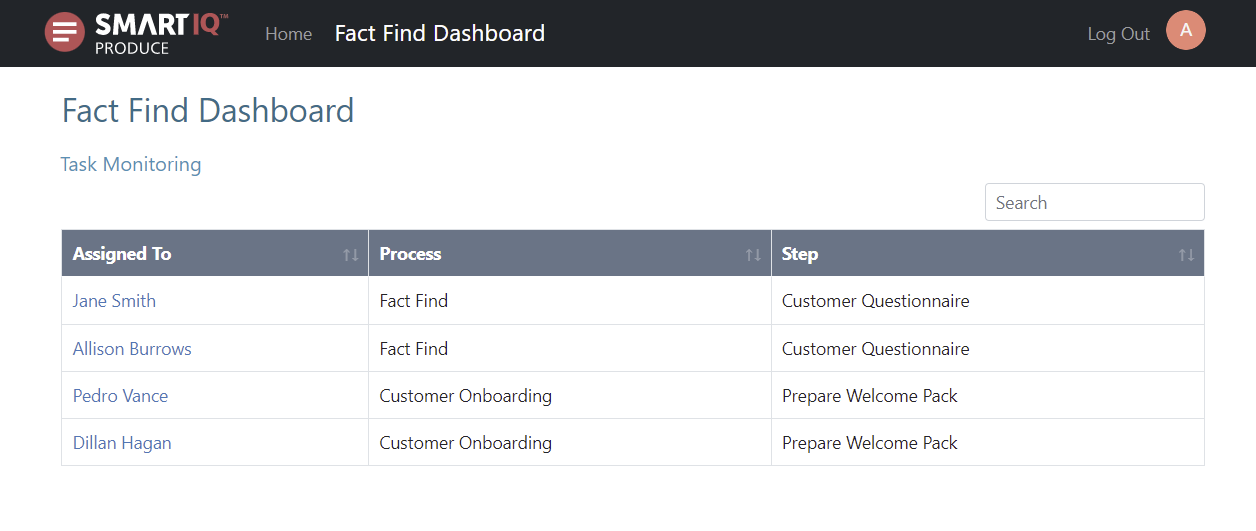
As part of the new observer role functionality, three new data objects have been added:
- Observer tasks assigned directly to the user
- Observer tasks assigned to the user's groups
- A combination of both direct and group assigned
With these data objects its easy to build dashboards to direct users to their observable workflow tasks.
Bootstrap 5 Icon Font
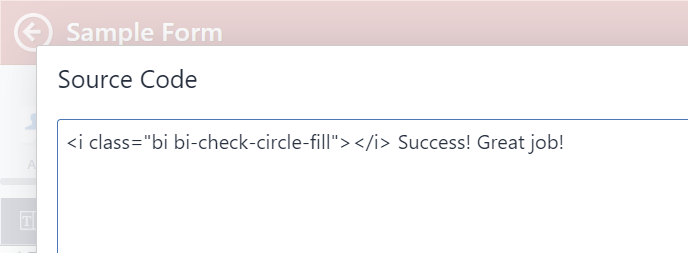
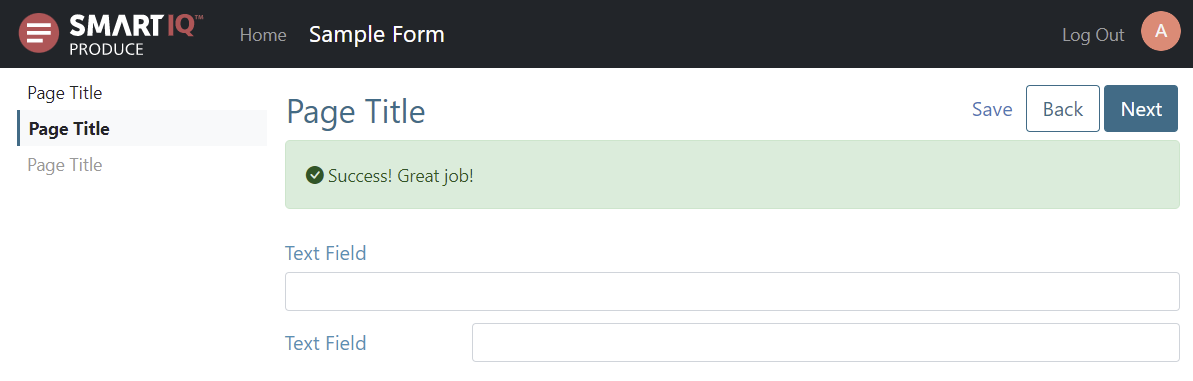
Following from our update to Bootstrap 5, this version now includes the Bootstrap 5 icon font, allowing designers to include any of these icons as part of their forms and dashboards.
Simply copy the class name required from the Bootstrap website (see link below), and paste into any HTML-enabled area - this means you can embed them in your question text, labels, data grids and more.
Floating Text in Autocomplete Questions
Floating text position can now be applied to autocomplete data questions, helping provide improved consistency to your forms using this space-saving approach.
REST Service Improvements
Form Data Support
REST Action and Escalation now support x-www-form-urlencoded and form-data with text values, allowing simpler posting of data from your SmartIQ forms to compatible REST services.
A body document (json or xml) is not required when using form values, and you can use the ‘Send as multi-part’ option to send any required generated/uploaded documents along with the multipart/form-data content.
Content-Type header control
REST Action, Escalation, and Data Connection now allow the Content-Type header to be overridden with a custom value.
While custom headers have already been supported, Content-Type was treated differently and would always use default values. This feature takes away this restriction enabling such scenarios as Vendor Specific Mime Types (SVMT).
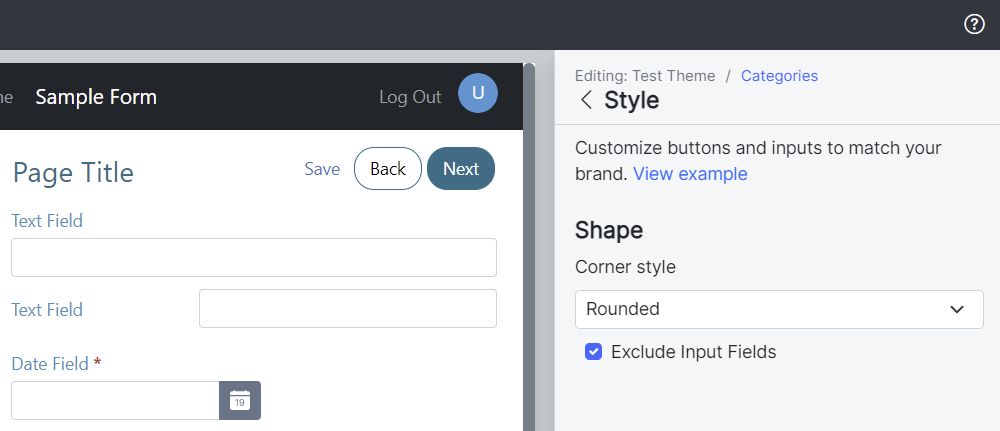
Theme Builder Corner Shapes on Inputs
This version provides a new feature in response to feedback allowing input fields to be excluded when rounded corner style is selected. The new checkbox only appears where 'Rounded' is the selected corner style.
IQ15.3
Released 17 October 2021
This product release enhances the core operating platform while also delivering on community driven enhancements. It's the first generally available version of IQ15.
IQ15.0, IQ15.1 and IQ15.2 were used as internal checkpoints and not released to market.
Theme Builder
Theme Builder provides a new way to apply branding to the SmartIQ Produce and Offline Apps experience. It replaces the theme settings feature with streamlined user experience and enhanced functionality.
Launched as it's own standalone interface, Theme Builder allows a Designer to configure over 20 different areas including support for fonts, button style, controls on color and extended logo support. A Designer can easily re-use Themes at the site level or for multiple published projects, instead of having to reapply theme settings to each published project.
Reduce the technical burden of creating and maintaining custom CSS skins by creating Themes in a dedicated and rich designer-focused UI. Instantly see the impact of changes before applying them, with a live preview capable of displaying various screen sizes from mobile through to full desktop.
For more information, refer to Theme Builder.
Produce Refresh
The IQ15 release starts to deliver on the strategic initiative to invest in the user experience across the entire platform.
Subtle changes to treatments, text hierarchy and interactions make the IQ15 release feel modern and fresh while remaining familiar to users. In particular:
- Information hierarchy has been updated and treatments simplified in Produce. Section text size, underlines on questions and improved spacing give a cleaner user experience.
- Toggle buttons are now outlined when deselected and filled when selected for clearer usage.
- Repeating Sections have been revamped to include row level deletion and duplication options.
- Shading and minor updates to selection treatments have been improved for Repeating Sections, Tab Groups and Accordions. This is to draw the eye to grouped questions.
- Navigation have shifted to text based buttons. This includes using the primary color as the call to action as well as treatments for secondary (Back, Add) and tertiary functions like Save.
The changes to Produce have resulted in an updated, modern yet familiar interface.
New Experiences
Enhancement requests from customers and partners as well as industry trends have introduced some new features into this release.
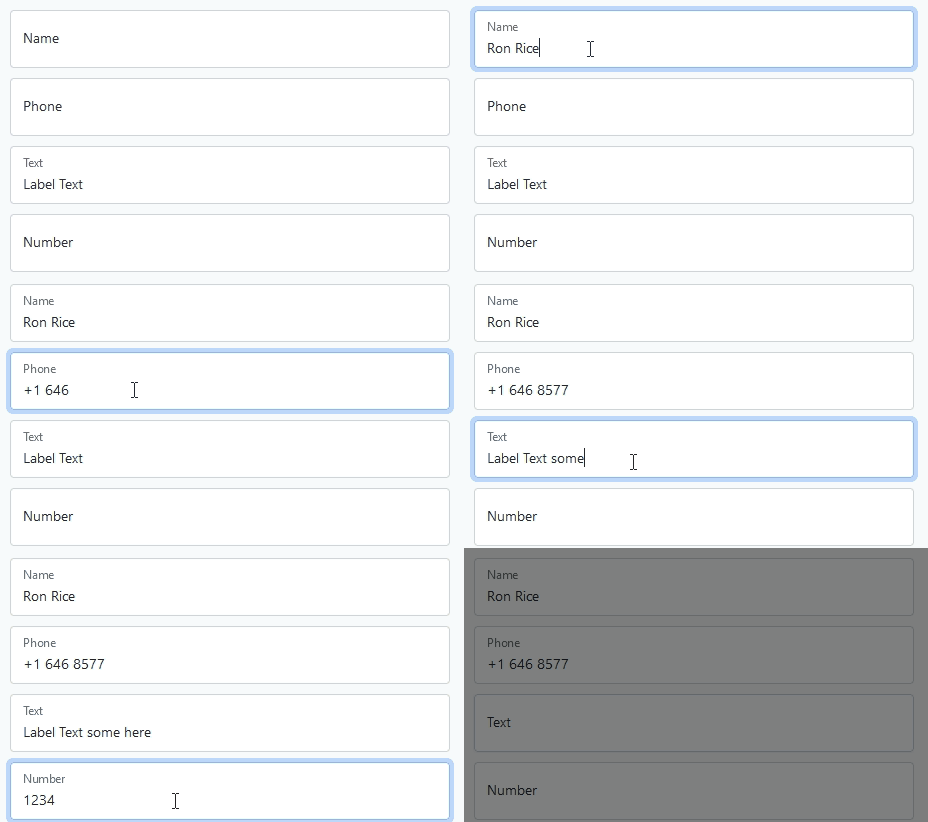
Floating Question Text
In addition to the existing Top and Left Text Position, IQ15 introduces a Floating Question Text Position type.
Floating Text Position uses a larger text field to embed the question text contained within the field. When focus is given to the answer the question text shrinks to make room for the user to enter text.
Linking Multiple Choice Questions
IQ15 introduces the ability to link several multiple choice questions by an id/group name to tie them together which would allow a single selection across multiple, Multiple Choice Questions.
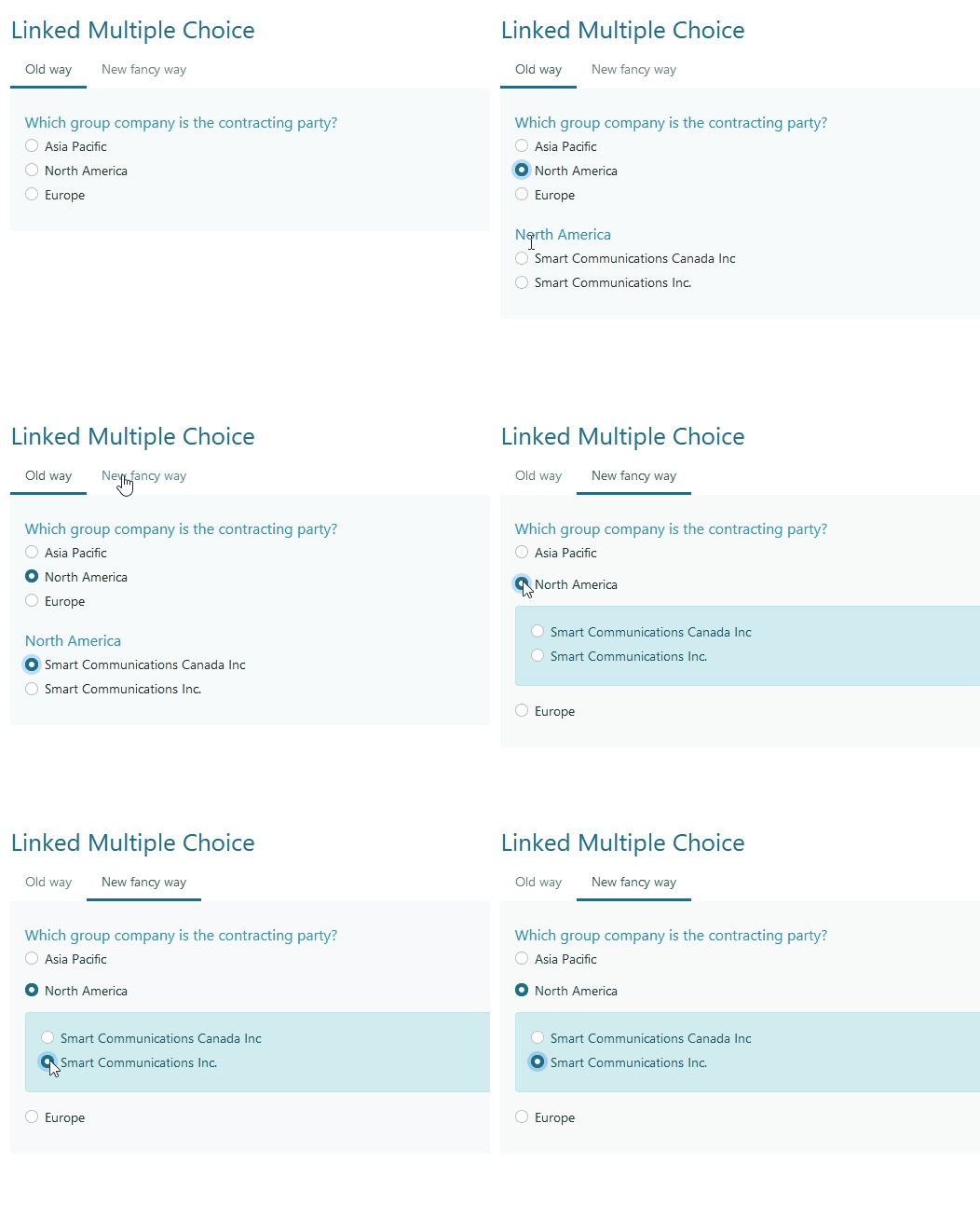
For more information, refer to Grouping id.
Relative Time
There is a new format string available on Answer Formats: RELATIVE This option will display a Date Time as relative to the user's current time. For example, 7 minutes ago, 4 days ago
File Controls
Customers have requested more control over defaults and restrictions when dealing with File Selections. The following enhancements were delivered for that need:
Question level file restriction
Control over File Selection limits at the Question level so an individual question can have a smaller upload limit than what the server will allow. This prevents larger than necessary uploads and a better user experience.
Tenant wide file type permitted list
Within Manage > Settings an administrator can now set tenant wide file type restrictions. This is to implement a default level of protection when File Selection question is used. A Designer can still override the individual restrictions on the Question.
Json output in Form Summary
The Form Summary capability has been a very popular solution to generating both an onscreen and receipt style documents that outline all the question and answers submitted by a user.
IQ15 includes an extension to the output formats to include Json.
The target use case for this output is that it’s a fully generated question and answer output that represents a user’s submission. Just like a PDF version but in a machine digestible format.
For example this output can be directly sent to a NoSQL DocumentDB to record every submission a user makes without having to configure a schema or data mappings.
Upgrade Warning
Please be aware that with each major release (E.g IQ15 vs IQ14) it's the opportunity to make changes to ensure the security and currency of all aspects of the platform. From time to time these changes cannot be optionally turned on and off and result in a breaking change which you must be aware of for a successful upgrade. There are new system requirements for this release, in particular that Microsoft Internet Explorer (any version) and Microsoft Edge (lower that version 16) are not supported for any interface in SmartIQ.
For an on-premise deployment please review the Release Notes, What's New guide and the Upgrade Considerations while planning your upgrade to IQ15.
Release Notes on the CommunityCheck out the full release notes and What's New Guide for each release on the Community.
Updated about 1 year ago