
What's new in version 11.2
Updated System Requirements
64-bit OnlyIntelledox only supports 64-bit, this applies to produce, manage and Scheduler.
SQL Server 2008 R2SQL Server 2008 R2 is no longer supported. Applies to Intelledox Database
Main enhancements
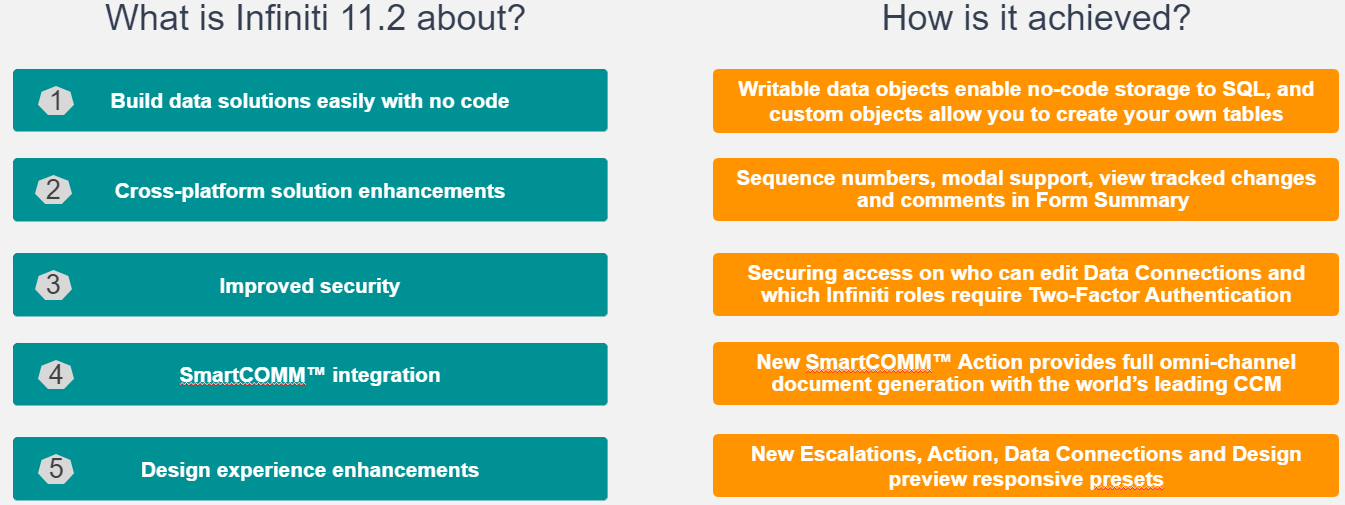
Custom Data Objects
Key Features
- Define custom data tables
- Range of data types and options supported
- Drag and drop to map fields to form questions
- Persisted in Intelledox DB
How does this benefit you?
- No SQL skills or coding required
- Significant reduced time to market
- Easier to re-use data as distinct entities
Store form data with no codeSignificant time saving to store data into tables and eliminate the need for SQL skills to create and maintain tables, views and stored procedures
Writeable Data Objects
Key Features:
- Configure the writeable data object permissions
- Read, insert, update and delete supported
- Use built-in form UI
- Supports Infiniti custom objects or SQL Server
- Save data on-the-go or on submission
- Writable Data Object Override Action to control the flow of data saves
- Fully integrated with Data Grid
How does this benefit you?
- Reduced time to configure data operations
- No direct DB access required to set up data objects
- Solutions more cloud-ready
- Control access permissions as well as when data is saved.
- Flexibility in user experience to suit a wide range of possibilities.
Read, insert, update and delete data
- More flexibility for designers and business users with a reduced effort to interact with stored data, including entities like customers, and lookups like country or region.
- Data can be written during form submission, workflow transition or Action Button click.
- Build flexible solutions that push data to back-end SQL on demand – so that it is stored exactly when it’s needed.
Data Modals
Key Features:
- New Data Modal project type defines a modal pop-up UI for data interactions
- Flexibility to use different Data Modals for different contexts
- Easy to configure and use in your projects
How does this benefit you?
- Use modals to save space, and improve user experience on all devices.
- Provide context-aware UI for different use cases.
- Leverages existing Design skills.
Create your own insert/edit UIsData Modal forms can be associated with your data entity in any form to provide inline data editing functionality that pops up when needed.
SmartCOMM™ Integration
Key Features:
- New Data Model template to drag-and-drop fields
- Action to specify target SmartCOMM™ template
- Configure one or multiple SmartCOMM™ actions
- Each action can address a different template and/or channel
How does this benefit you?
- Leverage existing SmartCOMM™ template investments
- Seamless integration with powerful omni-channel output
- Generate different templates catering for different channels and business rules
SmartCOMM™
- Integration with SmartCOMM™ leverages the world’s leading CCM for complex document generation.
- Familiar experience for Designers in mapping the data model fields like Intelledox placeholders
- Specify different SmartCOMM™ templates directly within your Intelledox projects
- Flexibility to generate one or more SmartCOMM™ template based on context-driven rules
User-defined Sequence Numbers
Key Features:
- Create sequence or reference numbers for forms
- Sequence pattern can include static components as well as dates and/or numbers
How does this benefit you?
- User-friendly identifiers that end-users can reference.
- Designer can configure different sequences for different forms.
User friendly referencesCreate, manage and apply user-defined sequence numbers to provide user-friendly references
Configure Sections As Modals
Key Features:
- Simply select ‘Modal’ on a section to configure
- Launch modals with a configurable button
How does this benefit you?
- Save form real-estate
- Great in repeating sections to hide complexities of row data
Improved UI
- Display any section as a Modal sub-form, which pops up on demand to reveal the section’s questions.
- Save space for more on-screen – or for instantly improving the mobile user experience.
Show track changes and comments in Form Summary
Key Features:
- Form Summary question can display answer history.
- Form Summary Action can include answer history in document output.
How does this benefit you?
- All changes displayed in one area
- Maintains the traceability on what changes occurred in a generated output.
Answer History
- An end-user can view the form summary and understand the answer history of the form.
- View all changes and comments in one place generated as a document - great for approving forms via email.
Redirect on Finish Enhancements
Key Features:
- Control user experience on submission
- Redirect options available for form submission and on workflow transitions
- Redirect to Project allows Project Properties to be passed to the target
How does this benefit you?
- Enhanced end-user experience
- Easy UI to select redirection target
Improved navigation
- Choose where users should be taken on submission of the form, including for workflow transitions.
- Detect the use of a mobile app to provide more targeted content, and control exactly what happens on workflow transition on any device
Other enhancements
Improved Security of Data Connection Management
- Organize data connections with folders, and apply security groups to restrict access
- Reduce risk with greater granular control over which Infiniti groups can edit Data Connections
Enforce Two-Factor Authentication by Role
- Configure which roles require two-factor authentication
- Improve level of security when users carry a specific Infiniti role
Data Connection Related Projects
- Determine which projects consume a data connection or object
- Increased visibility on Data Connections / Objects usage helps determine impact of any changes
New Escalation Types - Webhooks and REST Services
- New escalation types allow workflow tasks to notify external systems via Webhook or REST service requests
- Flexibility to notify external systems when escalation thresholds are met, configured using the familiar escalation rules system
Control Document Sort Order for Actions
- Actions now allow Designers to control of the order in which documents are processed, with new sort controls
- For Actions such as PDF Stitch and DocuSign the order of document processing is important to the end result
Design Preview Responsive Presets
- Adjust the new preview device size drop-down to see what impact different screen sizes will have.
- Save time by seeing a real-time preview in different screen sizes and formats. Great for building mobile app solutions.
Design Preview Theme Settings
- Theme settings applied in Manage will now render in the Design preview window, allowing greater visibility for designers
- Providing consistency on how the theme will look both during design and at run-time
Updated over 1 year ago